Short answer
Open the Meta Ads Library (facebook.com/ads/library), choose an EU country and search a brand or keyword. On an ad card, click "See ad details" and open "Transparency by location": it shows the ad's EU reach and its breakdown by location, age and gender. The free Reveal Reach extension shows that number on every card.
What "reach" means in the Meta Ads Library
The Meta Ads Library is Meta's public database of the ads running on Facebook, Instagram, Messenger and Audience Network. Under the EU Digital Services Act (DSA), Meta publishes extra data for every ad delivered in the European Union:
- EU reach: Meta's estimate of how many accounts in the EU saw the ad at least once.
- Reach breakdown: the same reach split by country, age range and gender.
- Targeting: the locations, ages and genders the advertiser selected.
- Advertiser and payer: who ran the ad and who paid for it.
Reach is not impressions. Reach counts accounts; impressions count views. One account can see the same ad several times, so impressions = reach × frequency.
This data exists only for ads delivered in the EU. An ad that ran only in the United States, the United Kingdom or other non-EU countries has no EU reach. For ads about social issues, elections or politics, Meta also publishes ranges of spend and impressions; for all other ads the spend is not public.
Method 1: see the reach by hand
This works for any ad and needs no extension, but you check one ad at a time.
- Go to facebook.com/ads/library. You do not need to be logged in to Facebook.
- Choose an EU country (for example Italy, France or Germany) and the All ads category.
- Search a brand name or keyword and press Enter. Use the filters to keep only active ads if you want.
- On an ad card, click See ad details. If the card says "N ads use this creative and text", the button is See summary details: open it, then open one of the versions listed.
- In the details panel, open Transparency by location. Under EU ad delivery you find the Reach, which Meta defines as "the number of Meta Accounts in the EU that saw this ad at least once", and the table Reach by location, age and gender. Meta renames these sections from time to time: if you do not find them, look for the part of the panel about the European Union.
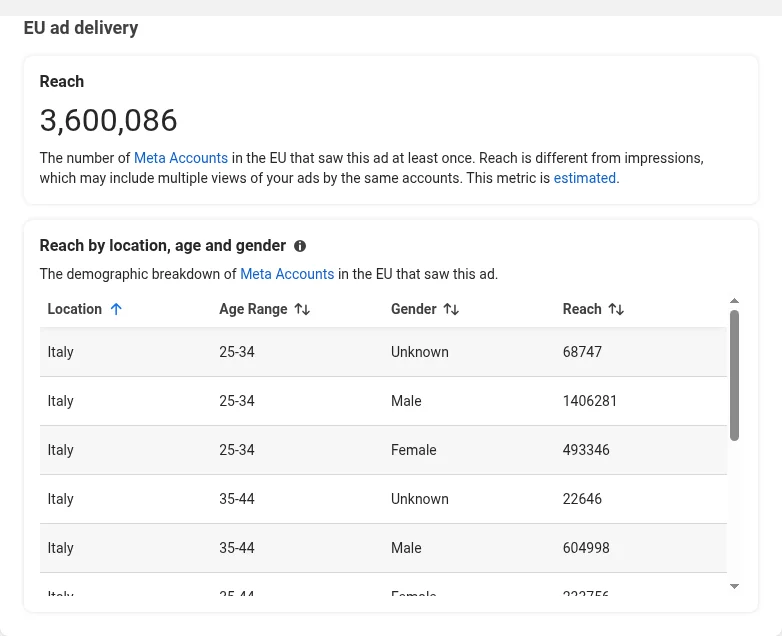
The limit: the Ads Library can sort results by "Impressions: high to low", but it does not show any number on the cards. To know and compare the reach of 30 ads you have to open 30 panels and copy the numbers somewhere.
Method 2: see the reach of every ad on the page
Reveal Reach is a free Chrome extension that opens the ad details for you and writes the EU reach on each ad card.
- Add Reveal Reach to Chrome and sign in with Google or with a free account.
- Run your search in the Meta Ads Library with an EU country selected, as in method 1.
- Click the extension icon, enter your CPM and frequency, then click Analyze Ads. The extension opens the details of one ad at a time, so a full page takes a few minutes. It also works on grouped ads ("N ads use this creative and text"). You can stop at any time and keep the results collected so far.
- Each analyzed card now shows the EU reach (as "Views"), the estimated spend, the spend per day and the days of activity. Click Sort by Reach (Desc): the ads that reached the most people move to the top of the page.
- Click PDF on any card for a printable report with the creative, the copy, the EU reach, the estimated spend and the audience breakdown.
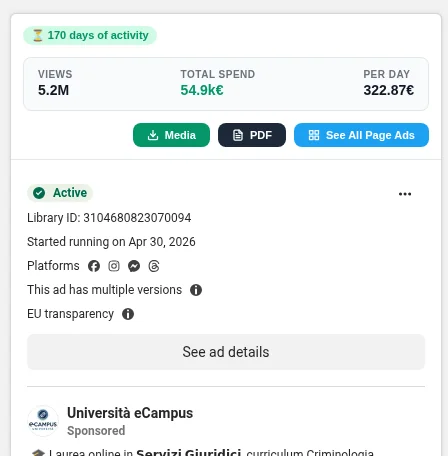
The extension reads only the data that the Ads Library page already shows you, inside your browser. The Ads Library data is never sent to a server.
How to estimate ad spend from reach
Meta does not publish the spend of commercial ads, but you can estimate it from the EU reach:
Estimated spend = (Reach ÷ 1,000) × CPM × Frequency
CPM is the cost per 1,000 impressions; reach × frequency gives the impressions. An example:
| Input | Value |
|---|---|
| EU reach | 200,000 |
| Frequency | 1.5 (so 300,000 impressions) |
| CPM | €7 |
| Estimated spend | 200 × €7 × 1.5 = €2,100 |
Which CPM to use
The best CPM is your own, from campaigns in the same niche and country. Without data of your own, use a benchmark for the country. Average Meta Ads CPM by country estimated by Pantheon (benchmark period August 2025 to July 2026), published in USD and converted to euros at the ECB reference rate of 23 October 2026 (1 EUR = 1.1193 USD):
| Country | Average CPM (€) | Average CPM (USD, source) |
|---|---|---|
| Germany | 8.98 | 10.05 |
| Netherlands | 8.22 | 9.20 |
| France | 7.19 | 8.05 |
| Italy | 6.43 | 7.20 |
| Spain | 5.18 | 5.80 |
| Poland | 4.91 | 5.50 |
| EU average (25 countries) | 6.32 | 7.07 |
The full file has all 25 EU countries and 17 niches, from apparel to online courses: download Pantheon's Meta Ads CPM estimates (CSV). All countries in euros: Meta ads cost in Europe. The free ad spend estimator fills in the CPM for the country and niche you choose and does the math for you.
Which frequency to use
Use the average frequency of your own campaigns. Without data, Databox (March 2026) reports a median campaign frequency of 3.01, with stable top-performing campaigns around 2.21. A value between 1.5 and 3 is a reasonable starting point.
Keep in mind: the result is an estimate, not Meta's real spend. Bidding, campaign objective, placements and audience change the real CPM. Use it to compare ads and to understand the order of magnitude of a competitor's budget.
How to read the results
- High reach and an old start date: the "Started running on" date on the card tells you how long the ad has been live. An ad that keeps running for months with a high reach is one the advertiser keeps paying for, a strong sign that it sells.
- Compare versions: when an advertiser runs several versions of the same creative, the reach shows which one Meta delivered the most.
- Read the breakdown: the reach by country, age and gender shows who the ad actually reached, which can differ from the targeting.
- Mind the scope: EU reach covers only the EU. A brand that also advertises in the US or the UK spends more than the EU figures suggest.
To go one step further, Pantheon, the ads intelligence platform behind Reveal Reach, starts from the ads that have been running in your market for months, explains why they sell and helps you turn the same mechanism into ads for your own offer.
Common questions
Can I see the reach of ads outside the EU?
No. Meta publishes reach only for ads delivered in the European Union, because the Digital Services Act requires it. Ads shown only in other countries have no reach data, except ads about social issues, elections or politics, which have ranges of impressions.
Is the EU reach the number of people who saw the ad?
It is Meta's estimate of the number of accounts in the EU that saw the ad at least once. It is close to the number of people, but it counts accounts and it is an estimate.
Do I need a Facebook account to see the reach?
No. The Meta Ads Library is public and works without logging in to Facebook. Reveal Reach needs only its own free account.
Is the estimated spend accurate?
It is an estimate based on the CPM and frequency you choose. It gives you the order of magnitude of a budget and lets you compare ads, but it is not the amount the advertiser paid.
Why does an ad show no reach?
Usually because it was not delivered in the EU, for example an ad that targets only the United States. Check that you selected an EU country in the Ads Library and that the ad's targeting includes EU countries.
See the EU reach of every ad on the page
Reveal Reach is free, with no usage limits and no credit card.
Add to Chrome - It's Free